feeLLGood – Mesh
FeeLLGood micromagnetic simulations are based on the finite element method, which requires the geometry of the simulated object to be modeled by a mesh. This mesh has to be provided by the user in a format feeLLGood understands, namely any of the native formats of the the GMSH mesh generator. As these formats can represent a class of meshes that is more general than what feeLLGood can use, one must be aware of the constraints feeLLGood places on the mesh.
General GMSH mesh
In the general case, a GMSH mesh consists of:
-
a collection of “nodes”, each node being a point in 3D space
-
a collection of “volume elements”, each such element being a polyhedron having nodes as its vertices, and optionally belonging to a named volume region
-
a collection of “surface elements”, each such element being a polygon having nodes as its vertices and optionally belonging to a named surface region
A GMSH mesh may have duplicate elements, i.e. multiple elements representing the same geometrical polyhedron or polygon. This way a geometrical polyhedron or a polygon may belong to multiple named regions.
The coordinates of the nodes have no associated length unit. It is up to the user to choose the mesh length unit and document it in the settings file, as the mesh.length_unit parameter.
Mesh requirements for FeeLLGood
FeeLLGood places additional requirements on the mesh:
-
all volume elements must be tetrahedrons
-
all surface elements must be triangles
-
no duplicate elements, which implies that each geometrical tetrahedron or triangle belongs to at most one named region (no overlapping regions)
-
the volume regions must partition the volume of the object, i.e. each tetrahedron must belong to exactly one volume region
-
each surface element must belong to at least one boundary of a volume region: either the external surface of the object or an interface between two volume regions
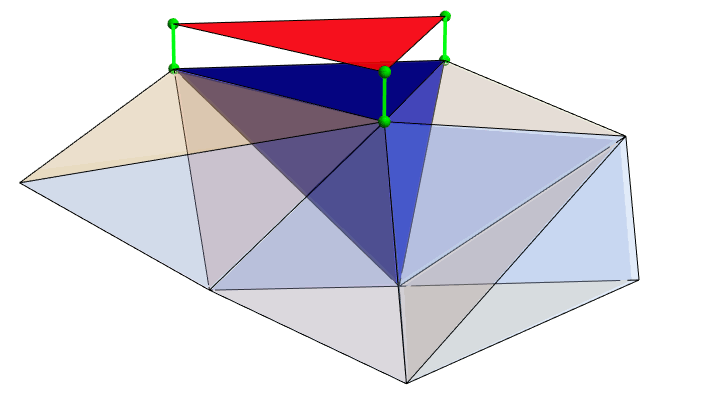
Each surface element is the face of at least one tetrahedron. This is illustrated in the figure below, which represents a partial mesh close to the surface of an object. The blue tetrahedron is a volume element adjacent to the surface. Its top face is a triangle coincident with a surface element (in red). The red triangle has been offset vertically for clarity: in reality the triangle’s vertices and the three top tetrahedron vertices are the same nodes (in green).
FeeLLGood does not require the user to mesh all the surfaces and interfaces of the object. Only those that require non-default settings (like, e.g., a non-zero surface anisotropy) have to be explicitly covered by named surface regions.
How to create the mesh?
There are multiple ways to create the mesh.
With feeLLGood’s meshMaker module
FeeLLGood is distributed with a Python module named meshMaker which allows to easily mesh some simple geometries. Meshes built with this module always meet FeeLLGood’s requirements. As an example, the following Python script builds the mesh of a prolate ellipsoid of revolution:
from feellgood.meshMaker import Ellipsoid

mesh = Ellipsoid(
    r1 = 20,               # radius along x and y
    r2 = 30,               # radius along z
    mesh_size = 3.5,       # typical element size
    surfName = "surface",  # name of the single surface region
    volName = "volume"     # name of the single volume region
)
mesh.make("ellipsoid.msh")  # save to a file
Although very easy to use, this module is limited to a few simple geometries: cuboid, ellipsoid of revolution, cylinder, tube, icosahedron and solid of revolution. See the documentation of meshMaker for details.
With Python / GMSH
GMSH is a very capable mesh generator, well suited for meshing complex geometries. It is our recommended choice for anything that is not covered by the meshMaker module. GMSH provides a Python interface, which the GMSH authors recommend as the preferred way of building new meshes. Its usage is quite complex though, and falls beyond the scope of this documentation. See the GMSH documentation for details.
Keep in mind, though, that GMSH can generate meshes that are not suitable for feeLLGood. See the section Mesh requirements for FeeLLGood above.
With any software that can export to the GMSH format
FeeLLGood does not care about how the mesh was generated, as long as it is in the GMSH format and conforms to the requirements listed above. You can use any software that can export such a mesh.
Alternatively, you can build the geometry with CAD software and export it to a format GMSH can import, then use GMSH to create the mesh file.